
Questions?
We've answers.

MY alrajhi
Topics
- What should I know about MY alrajhi

What should I know about MY alrajhi
MY alrajhi is the mobile banking app of alrajhi bank Malaysia—a full-fledged Islamic bank licensed by Bank Negara Malaysia. Whether you’re new to digital banking, building your wealth through digital gold, or managing your debit and credit cards, we’ve built everything you need into one secure, seamless platform.
The MY alrajhi app is available to all individual alrajhi bank Malaysia retail customers.
You can download it from the Apple App Store or Google Play.
- iOS 16 and above
- Android 11 and above
To use the app, your device must not be a rooted or jailbroken device, and you need a stable internet connection. If you do not update your mobile device to the minimum required operating system, you will no longer be able to use MY alrajhi.
If you already hold an active savings/current/credit card account with alrajhi bank Malaysia, you can simply download the app and follow the on-screen prompts to link your account and set up your login details. Please keep in mind that a standard 12-hour cooling-off period will apply for first-time digital banking logins to ensure your account security.
It depends on how your joint account was set up:
- Yes, if the account operating condition is 'Either One to Sign.' You can register and access the app individually.
- No, if the account requires 'Both to Sign'. For security and authorization purposes, these accounts cannot be accessed via the mobile app.
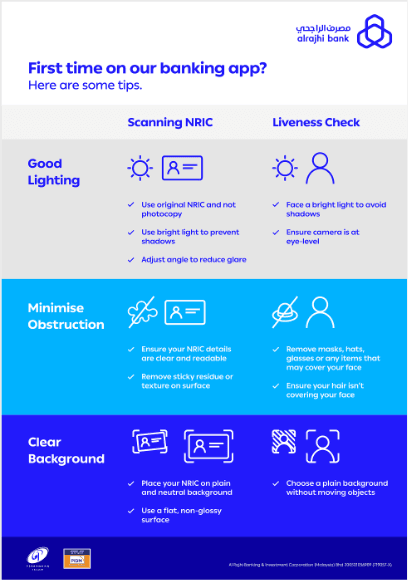
Yes. The MY alrajhi app is available for download to new customers, who can complete the entire digital onboarding process directly within the app. New users can sign up to open and activate a DuitPlus Savings Account-𝘪, to begin banking digitally immediately. Below are a few key steps to help new users get started:
No, you can’t. You can only activate your MY alrajhi account with a Malaysian phone number.
Login and security
Absolutely. MY alrajhi is built with robust security features to protect your banking:
- Secure device pairing: Your first-time login and device registration require a One-Time Password (OTP) for authentication. For your protection, only one device can be linked to your account at a time.
- Protected access: All banking services within the app are securely protected by your login credentials.
- Exclusive session control: Only one active login session is permitted at a time. If your MY alrajhi account is accessed from a different device, your current session will automatically end, preventing unauthorized concurrent use.
- No sensitive data stored: We do not store any confidential account information directly on your mobile device, further safeguarding your financial details.
If an OTP does not arrive:
- Check spam or blocked messages: Ensure the SMS app or device settings have not muted or auto-filtered incoming bank notifications.
- Verify network signal: Confirm a stable mobile signal. Toggling Airplane Mode on and off can help refresh network connectivity.
- Check inbox capacity: Clear old text messages to ensure device storage is not full.
- Wait 1–2 minutes: Allow up to two minutes before tapping Resend OTP.
If the OTP is still not received after trying these steps, please contact Customer Care at +603-2332 6000 for immediate assistance.
Yes, you can access MY alrajhi on a new device using their existing credentials, which automatically unbinds your account from the lost or old device. Rest assured, personal account information is not stored on the device after logging out, so the account remains secure. A 12-hour cooling-off period applies upon logging in from a new device, during which certain banking activities may be restricted. As a precaution, avoid saving passwords or confidential account details directly on any device.
The Kill Switch is a 24/7 self-service emergency security feature designed to instantly protect accounts from suspected fraud. When activated, it immediately blocks all incoming and outgoing transactions, as well as digital banking access.
Here is how to locate and activate the Kill Switch in the app:
- Log in to the MY alrajhi app.
- On the main dashboard, tap More options.
- Select Kill Switch.
- Review the prompt and confirm to freeze account activity immediately.
Yes, you can. However, for security reasons, account unfreezing cannot be done directly within the MY alrajhi app.
To safely restore access to your account:
- Contact our Customer Care team at +603 2332 6000.
- Complete the required security and identity verification process with our Customer Care agent.
- Once verified, your account and digital banking services will be unfrozen.
One-time password verification (Security update)
As part of a recent security enhancement, customers who normally log in using biometrics or PIN will be required to complete a one-time login using their app password to verify their identity. Once completed, you may continue using your preferred login method as usual.
This update applies to active MY alrajhi app users who currently log in via Face ID, fingerprint, or PIN. Customers who already log in using their password as their primary method will not notice any difference.
No. This is a one-time password verification. After successfully logging in with your password, you may continue using your preferred login method.
Select Forgot Password on the login screen and follow the instructions to reset your password. Once your password has been successfully reset, complete your one-time login before continuing to use your preferred login method.
No. This security enhancement only affects the login process. Your accounts, balances, and banking services remain unchanged.
My alrajhi is no longer on HUAWEI
Effective 15 June 2026, MY alrajhi will no longer support Huawei devices due to platform and technical compatibility requirements. This allows us to continue providing a secure and reliable digital banking experience for our customers.
Users on non-Huawei Android devices (e.g., Honor, Vivo, Samsung) who downloaded the app via Huawei AppGallery must uninstall it and download the official version from the Google Play Store. Devices must run Android 11 or above or iOS 16 or above to maintain access.
Log in to the MY alrajhi app.
Tap the Profile icon (top left).
Go to Privacy & Security > Manage mobile device.
Select the active device and confirm deregistration.
After deregistration, you can log in to the account on any supported iOS or Android device using your existing credentials. A standard 12-hour cooling-off period applies when you log in from the new device.
If you switch to a new device, you must re-enroll your digital security token (DigiSecure) on the MY alrajhi app. For your protection, a 12-hour cooling-off period will apply before you can perform any transactions on the new device.
No. Rest assured, your account details, balances, and transaction history will remain unchanged. Changing devices does not affect your money or account information.
Yes, you will be able to access your account through other channels, including:
Visiting any alrajhi bank Malaysia branch or Smart Financial Center (SFC)
Using your debit card at ATMs
Making payments using your debit card
Yes. Your alrajhi bank Malaysia Debit Card-𝘪 will continue to work as usual and will not be affected by this change.
If you choose to close your account(s) with us, please contact our 24/7 Customer Care team at +603-23326000 or visit the nearest alrajhi bank Malaysia branch or SFC for assistance.
App management and profile settings
Usernames cannot be changed once your account is created, as it serves as a unique identifier tied to the account.
To edit your profile, go to Profile Settings & Services.
- Click on Profile to update your personal details.
- Save changes to apply the updates immediately.
a) Check to ensure your device has a good internet connection.
b) Turn Airplane mode on and off.
c) Close and relaunch the app.
If all the above don’t work, please contact our Customer Care team at +603-2332 6000 for assistance.
You can view and download your monthly e-Statements for the past 12 months directly through the MY alrajhi app (applicable for all CASA accounts):
- Log in to the MY alrajhi app.
- On your main dashboard, tap More options.
- Select Latest statements to view or download your required statements.
For older statements, please contact our Customer Care team at +603-2332 6000 for assistance.
1. Log in to the MY alrajhi app
2. Tap the Profile menu at the top left
3. Select Privacy & Security
4. Choose Manage mobile device
After completing the steps, you may log in to the MY alrajhi app on another iOS or Android smartphone using your existing username and password. The standard 12-hour cooling-off period will apply after logging in onto a new device, during which you cannot perform or approve any banking transactions via the app.
No. Your account details, balances, and transaction history will remain unchanged. Changing devices does not affect your money or account information.
DuitPlus Savings Account-𝘪 and Savings Pots
Yes. Existing customers holding an active profile verified with a MyKad (NRIC), regardless of which alrajhi bank Malaysia products or accounts they currently hold—can open a DuitPlus Savings Account-𝘪 directly within the MY alrajhi app without visiting a branch.
How to apply in the app:
- Open the MY alrajhi app and log in.
- Create a username and password, then complete the secure identity verification process.
- Provide the required personal and employment information to complete account setup.
- Transfer a minimum of RM20 from an existing local bank account or online banking wallet to activate the DuitPlus Savings Account-i account.
Yes, but you must reactivate your account profile first. Accounts with no customer-initiated transactions for a continuous period of 1 year, or accounts with a balance under RM10, are classified as dormant. You will receive a notification prior to any account status change.
Please contact our 24/7 Customer Care team at +603-2332 6000 or visit any alrajhi bank Malaysia branch or Smart Financial Center to update your profile status before completing your DuitPlus application in-app.
It is a digital goal-setting tool that enables customers to organize funds into distinct savings buckets within their primary DuitPlus Savings Account-𝘪. Separate Pots can be created for specific milestones—such as emergency funds, home repairs, or education—allowing progress tracking toward individual savings targets.
Yes. Click on the edit icon on your Savings Pot details page to change it.
- Open your DuitPlus Savings Account-𝘪.
- Tap ‘Savings Pot’ or ‘View all’.
- Select the pot you want to close.
- Tap the trash icon located at the top right of the screen.
- Review closure details and tap Close Savings Pot to confirm.
Upon closure, the remaining Pot balance is credited instantly to the main DuitPlus Savings Account-𝘪. Direct transfers to external accounts or third-party banks are not supported.
Pot closure cannot be undone once confirmed. However, a new Savings Pot can be created at any time. Also, closing an individual Pot has no impact on other active Savings Pots or the main DuitPlus Savings Account-i.
Yes. Partial funds can be transferred out of a Savings Pot without closing the Pot entirely. Transferred amounts will move to the linked DuitPlus Savings Account-𝘪, where the funds become available for standard transactions or withdrawals.
Transfers and transaction services
Standing Instructions and Future-Dated Transfers allow customers to set up one-time or recurring transfers for a specified future date directly within the MY alrajhi app. These transfers can be modified or canceled at any time prior to the scheduled execution date.
A 1st-Party Foreign Currency Transfer allows customers to transfer funds between their own personal alrajhi bank Malaysia accounts held in different currencies (for example, moving funds from a Foreign Currency Account-𝘪 to a Savings Account-𝘪, or vice versa). To perform this transfer in the MY alrajhi app:
- Tap Send Money on the app dashboard.
- Select Bank Account, then choose Own Accounts.
- Follow the on-screen prompts to complete the transfer.
If the money was sent to an active account, act immediately and follow these steps:
- Contact Customer Care: Contact our 24/7 Customer Care team at +603-23326000. Be ready to provide details like the transaction date, time, and the recipient’s account information.
- File a police report: Visit your nearest police station to report the transaction.
Note: While alrajhi bank Malaysia will assist in fund recovery efforts, successful retrieval depends on the recipient's consent and their financial institution's cooperation. Customers are strongly advised to verify recipient details before confirming any transfer.
You can download and share your transaction receipt from the transaction history filter. This feature is only for in-app outgoing transactions.
No | Transaction type | Maximum daily limit | Default limit per day | |||
Resident Mass | Resident Affluent | Non-Resident Mass | Non-Resident Affluent | |||
1 | JomPAY (Bill Payment) | RM50,000 | RM100,000 | RM10,000 | RM10,000 | RM3,000 |
2 | Third Party Transfer (within bank) | RM50,000 | RM100,000 | RM10,000 | RM10,000 | RM5,000 |
3 | IInterbank Giro (IBG), DuitNow Transfer (To Account and/or Proxy) & DuitNow QR) | RM50,000 | RM100,000 | RM10,000 | RM10,000 | RM5,000 |
4 | Daily cumulative transaction limits | RM50,000 | RM200,000 | RM10,000 | RM10,000 |
|
Yes. Screenshots can be taken within the app for personal record-keeping. Customers are advised to exercise caution regarding personal data visible on screen when sharing screenshots externally.
Payments on MY alrajhi app
DOBW is a real-time online payment method that allows customers to make payments directly from their alrajhi bank Malaysia account to participating merchants. Payments are authorized securely through the MY alrajhi app without the use of credit or debit cards.
Payment process:
- Select DuitNow Online Banking/Wallets as the payment method on the merchant platform.
- Select alrajhi bank Malaysia from the list of participating banks.
- The system will securely redirect to the MY alrajhi app for authentication.
- Review transaction details and approve the payment within the MY alrajhi app.
- Once authorized, the transaction completes and redirects back to the merchant screen.
No, registration is not required. As long as you maintain an active deposit account with alrajhi bank Malaysia, you are automatically eligible to use DOBW.
New customers can activate a DuitPlus Savings Account-i using DOBW by making an initial verification transfer of at least RM20 from an existing account at another participating bank:
- Select ‘DuitNow Online Banking/Wallets’ as the verification method.
- Enter RM20 as the verification amount.
- Select your external participating bank (where funds are currently held).
- You will be securely redirected to the bank's online banking page or mobile app.
- Complete the authorization on the alrajhi bank Malaysia’s online platform. Upon successful transfer, the DuitPlus Savings Account-𝘪 will be activated automatically.
DuitNow AutoDebit is a digital payment service that allows merchants to collect automated payments directly from a customer’s registered alrajhi bank Malaysia account following a one-time consent authorization.
Depending on the arrangement made with the merchant, collections may be:
- Recurring: Regular automated payments for fixed or variable amounts (e.g., utility bills, monthly subscriptions, or loan installments).
- Ad-hoc: Occasional single payments initiated by the merchant as needed (e.g., top-ups or e-commerce purchases).
Registering AutoDebit consent via MY alrajhi:
- Log in to the MY alrajhi app.
- Navigate to More options > DuitNow AutoDebit.
- Select Send a request.
- Choose the relevant merchant, product name, source account, payment limit, and payment frequency.
- Review the details and tap Confirm to submit.
Once registered successfully, the merchant may begin collecting payments according to the agreed schedule.
DuitNow AutoDebit Consent Maintenance is an in-app feature that allows customers to manage their active consent mandates at any time.
How to edit or update consent via MY alrajhi:
- Log in to the MY alrajhi app.
- Navigate to More options > DuitNow AutoDebit.
- Select the relevant merchant mandate and tap Edit consent.
Choose from the available options:
1. Update: Modify payment limits or details (where permitted).
2. Suspend: Temporarily freeze merchant payment collections.
3. Cancel: Permanently revoke payment authorization (subject to merchant policy).
4. Transfer: Move the consent mandate to another participating bank.
When a consent is suspended or canceled in the MY alrajhi app, the merchant will immediately be prevented from collecting further payments. To resume automated payments in the future, a new DuitNow AutoDebit consent must be registered.
No. DuitNow AutoDebit is a complimentary service, and no bank charges apply to customers using this feature.
Credit card management and GoldInvest-𝘪
Existing alrajhi bank Malaysia credit cardholders can manage their cards digitally by logging into the MY alrajhi app under ‘Existing customer’.
Note: For customers who solely hold a credit card with alrajhi bank Malaysia, app access is restricted exclusively to credit card management features.
Available credit card management features:
- Card and transaction monitoring: View card details, balance, and real-time transaction history.
- Security and controls: Change card PIN, temporarily freeze or unfreeze cards, and authorize online transactions.
- Card activation and replacement: Activate new cards or report lost/damaged cards for replacement.
Credit cards can be activated through either of the following:
- Tap the Activate your Credit Card now notification banner on the main app screen and follow the prompts.
- Tap Accounts on the bottom navigation bar > select Cards > follow the on-screen instructions to complete activation.
GoldInvest-i is alrajhi bank Malaysia's digital gold investment account, available on the MY alrajhi app. Eligible customers can open and manage a GoldInvest-𝘪 account entirely in-app. It enables customers to buy, sell, and manage gold digitally—with holdings tracked in grams and valued in Ringgit Malaysia (MYR). They can also opt to convert their digital gold holdings into physical gold bars at any alrajhi bank Malaysia branch.
- Eligibility: Available to individual alrajhi bank Malaysia customers who hold an active primary (sole account holder) Savings or Current Account.
- Trading hours: Available daily from 8:30 AM to 11:59 PM. Orders placed outside these hours will not be processed until the next trading window opens.
- Transaction limits:
- Minimum purchase: RM10 per transaction (or equivalent in grams).
- Maximum purchase: 2 kg per transaction (or equivalent in MYR). - Execution: All buy and sell trades are executed using real-time market prices.
Business customers
Sole Proprietor accounts cannot be opened via the MY alrajhi app—they must be opened in person. Business owners may walk into any alrajhi bank Malaysia branch or Smart Financial Center during operating hours (no appointment needed).
Required Documents (Originals only; photocopies are not accepted):
- Original MyKad
- Latest SSM Business Registration documents (Form D, Business Registration Info, Owner Info, and Previous Owner Info, if applicable)
- Company rubber stamp
Once the Sole Proprietor account is activated at the branch, customers can register for the MY alrajhi app. Branch officers will guide customers through the setup to ensure the account is properly linked to the app.
Support and service requests
The International Bank Account Number (IBAN) is a unique 17-character identifier for financial accounts. It is used for account verification, official documentation, and processing transactions accurately.
- Log in to the MY alrajhi app.
- Tap ‘Financing’, on your app dashboard.
- Select ‘My financing list’.
- Your IBAN code (e.g., 107000000001375) will appear alongside the account name.
- Eligibility: Available to customers holding an active Current Account in good standing. (If the option does not appear, ensure the selected account is a Current Account and that the MY alrajhi app is updated to the latest version.)
- Delivery timeline: Chequebooks are typically delivered within 3 to 5 business days following successful request processing.
- Delivery address: Chequebooks are dispatched to the primary mailing address registered to the selected Current Account.
- Fees & charges: Standard courier and service charges apply in accordance with the bank’s Tariff & Charges.
They just need to follow these steps:
- Log in to the MY alrajhi app.
- Tap ‘Account’ from the main menu.
- Select your Current Account-𝘪.
- Tap ‘Get cheque book’.
- If you have multiple current accounts, choose the correct account.
- Review the details and submit your request.
Topics
- What should I know about MY alrajhi
- Login and security
- One-time password verification (Security update)
- My alrajhi is no longer on HUAWEI
- App management and profile settings
- DuitPlus Savings Account-𝘪 and Savings Pots
- Transfers and transaction services
- Payments on MY alrajhi app
- Credit card management and GoldInvest-𝘪
- Business customers
- Support and service requests
Have a question about our products or promotions?
Submit your details and we will be in touch soon.
Have a question about our products or promotions?
Submit your details and we will be in touch soon.